EFI DATA. TUNER INSTINCT.
YOUR DATA.
YOUR EDGE.
FULLSEND TUNER TOOLKIT
Turn your ECU logs into a clearer next tuning decision. Bring fuel maps, data analysis and repeatable workflows together—so you can spend more time focused on the tune.
Windows desktop software • EFI log analysis & tuning tools
DYNO & EFI SHOPS / RACING / MOTORCYCLES / POWERSPORTS / WEEKEND RACERS
START HERE
Meet your next
tuning workflow.
Take a real tour of Fullsend Tuner Toolkit. Learn the layout, load a log, explore the maps and follow a tuning round from data to review.
INSIDE THE TOUR
01:31Find your way around03:18Load a log04:13Work with maps06:05Filters & channels09:01A tuning round12:48Explore more toolsWatch here, or jump to a chapter on YouTube.
FROM LOG TO NEXT RUN
A clear path through the data.
Set up the workspace for your engine. Build a routine you can use again.
Bring your data together.
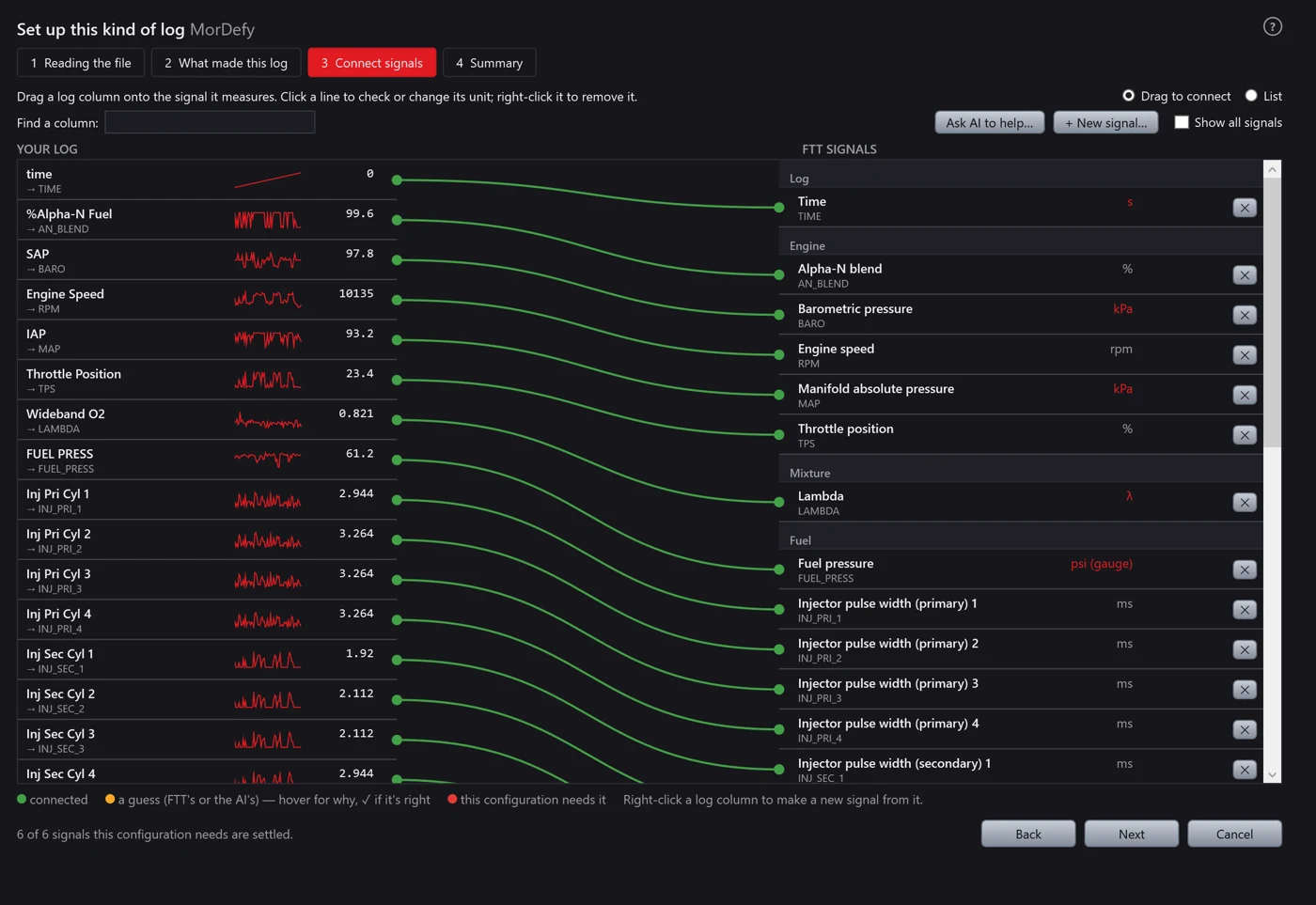
Load your CSV logs, connect the channels and check the units. Start from a fuel-system template, then match the grid to your ECU’s axes.
See what matters.
Compare logged lambda with your target. Review coverage, sample quality and trends with maps, graphs and plots linked to the same timeline.
Refine. Review. Repeat.
Shape the changes with map tools, check your work and copy the table into your ECU’s tuning software. Save your setup. Pro adds macros to automate repeat steps.
WORK IN THE TABLE YOU ACTUALLY TUNE
Your breakpoints.
Your targets. Your call.
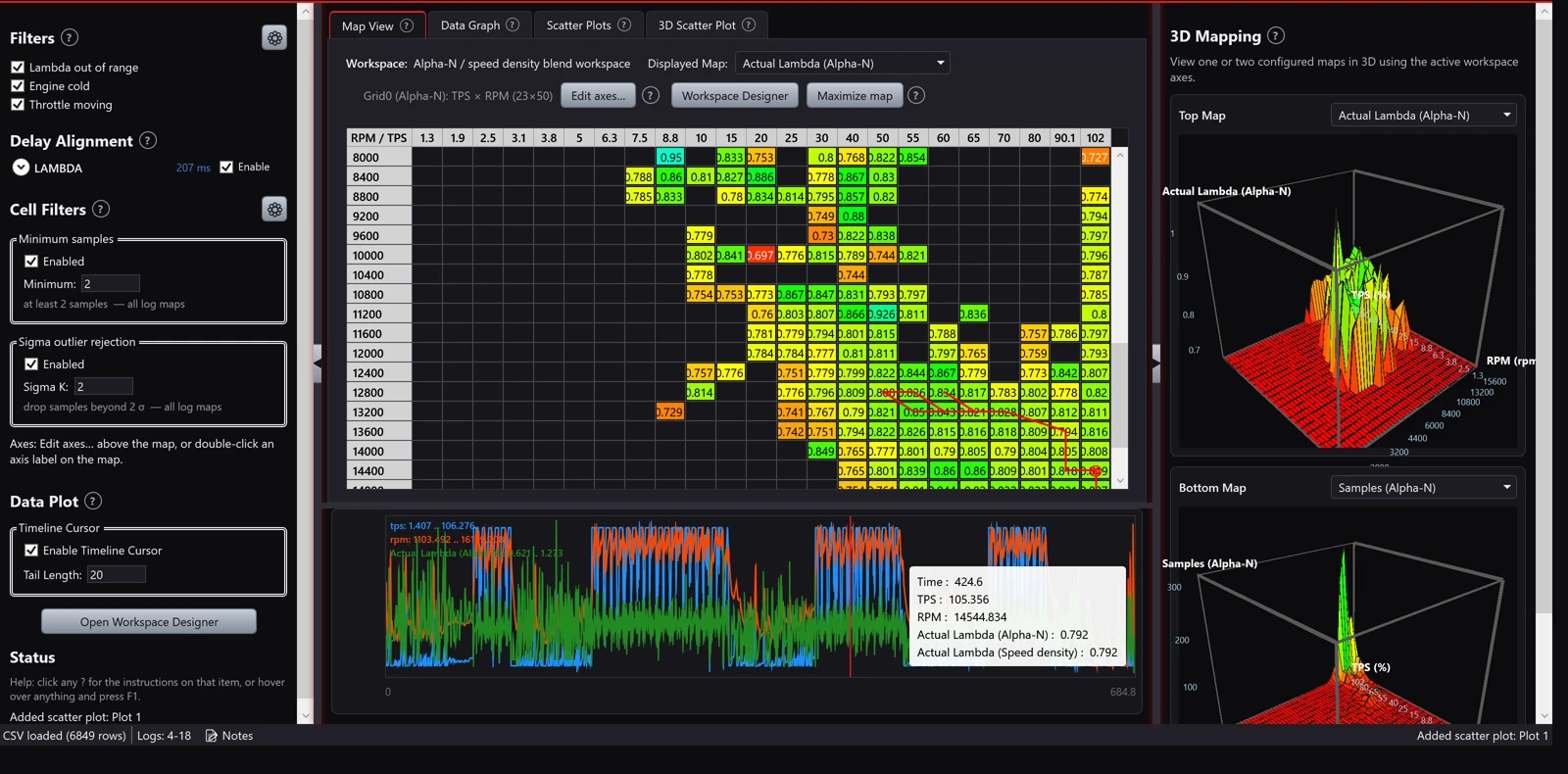
Bin logged data into your own map grid. See actual lambda, differences from target and computed corrections alongside the sample information that helps you judge them.
Inspect the evidence
Review sample counts, spread, confidence and standard error. Apply cell filters to match your standards for useful data.
Shape the map
Edit cells, interpolate, smooth or Smart Fill. Choose the destination map and review the result with a shared undo history.
Keep the judgment
Calculations and corrections are starting points. You review the changes and apply them in your own ECU software.
FOLLOW THE ENGINE, NOT JUST A NUMBER
Find the pattern.
Understand the run.
Move between time, load and mixture. Look at a channel in context, then explore how the signals relate.
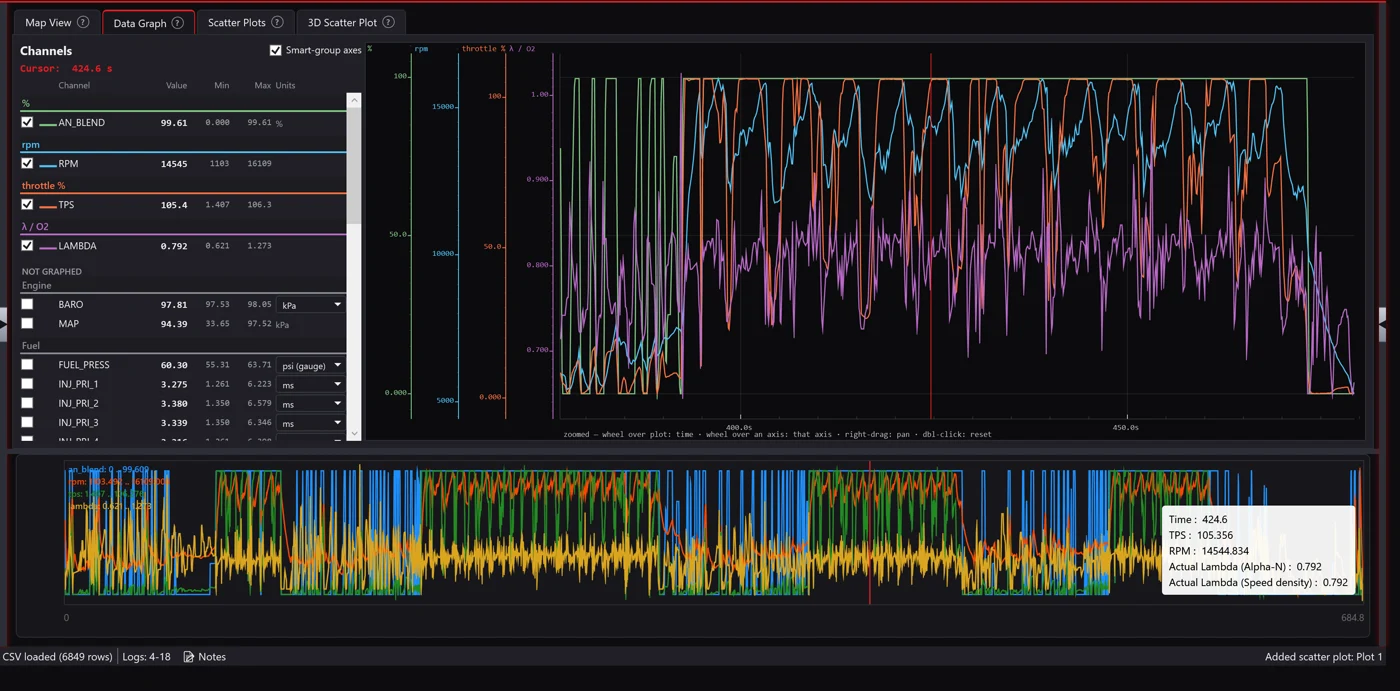
Every useful channel. In context.
Plot channels over time, zoom into an event and use the timeline cursor to connect the graph with your maps and plots.
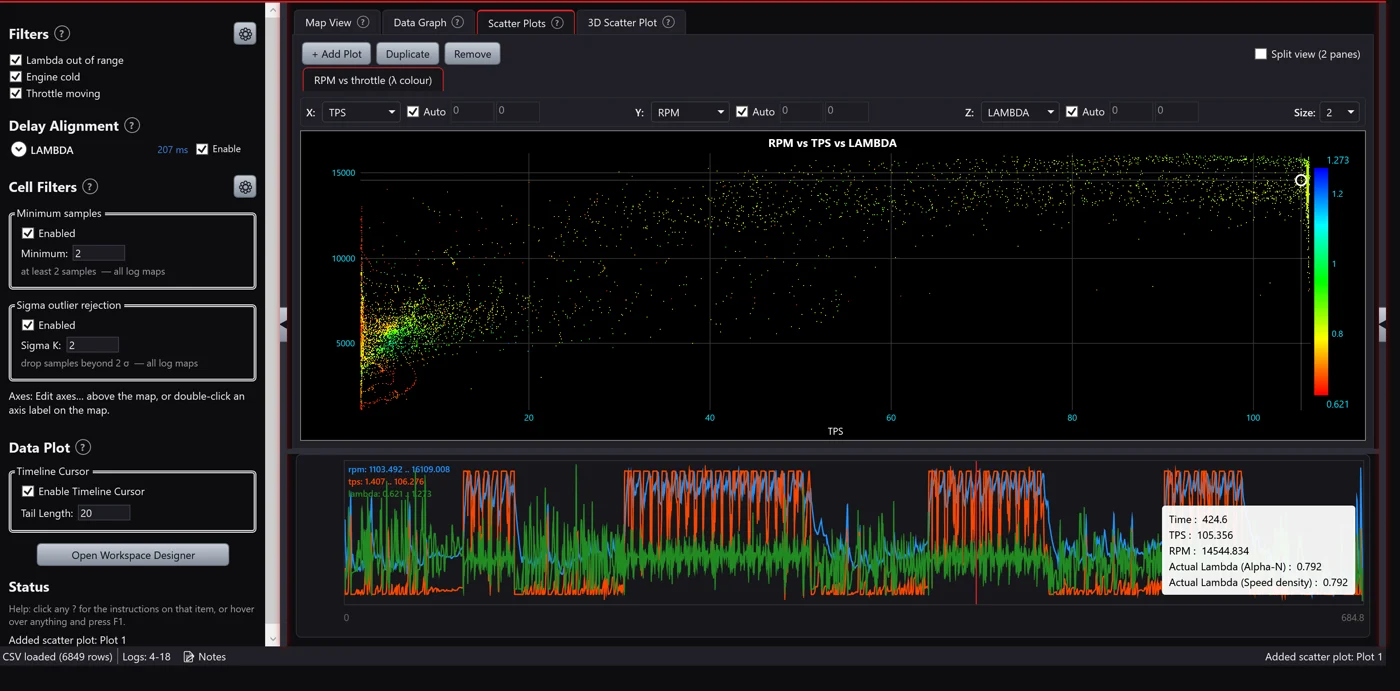
See relationships worth investigating.
Choose the axes, color by another signal and explore patterns in two or three dimensions.
LESS REPETITION. MORE TUNING.
Put your routine
to work for you.
Save the steps you repeat. Get a helping hand when you want one. Keep the decisions that matter.
Record once.
Replay your workflow.
Record a routine and replay its steps from a button. Add pauses where you want to check a result or make a decision. Macros work independently of AI.
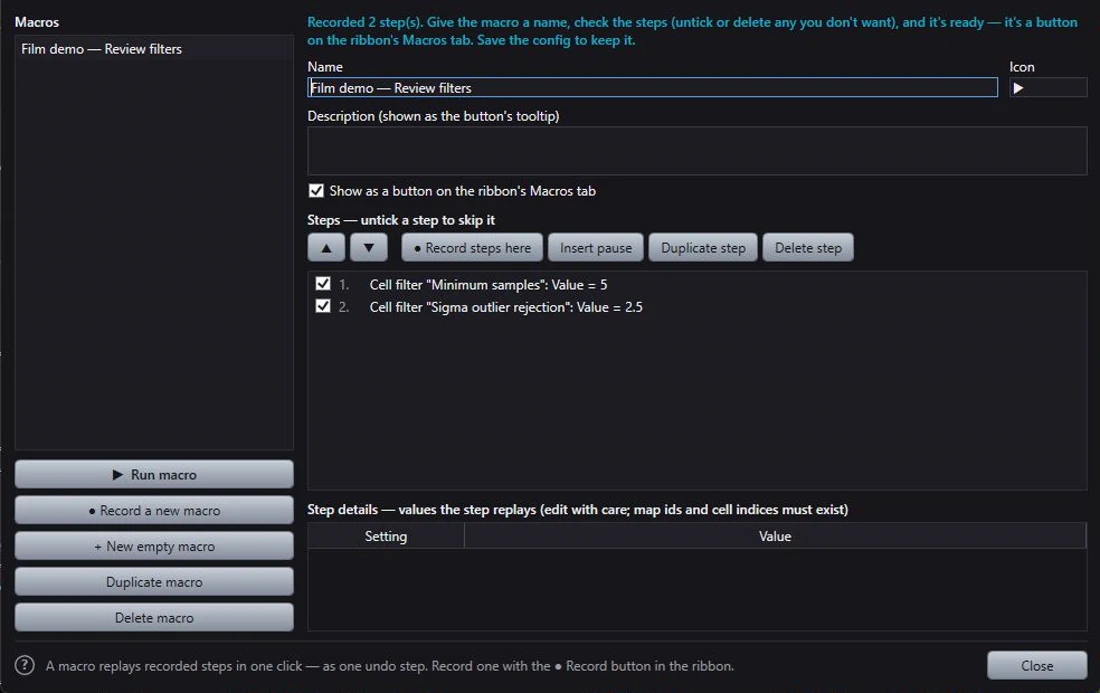
Your direction.
An extra set of hands.
Both plans support Claude, Codex or Gemini with your own AI subscription. Ask your AI to configure signals, build channels or plots and adjust filters. It can use any tool included in your FTT tier.
“Build an RPM vs. throttle plot, colored by lambda.”
AI is optional; your own AI subscription is required. Review every suggestion and change before use.
BUILT AROUND YOUR SETUP
Different ECUs.
One familiar workspace.
From the dyno shop to the race trailer, FTT is configured around your logs, channels and fuel strategy. The ECU brand does not define your workflow.
Start with Alpha-N, speed density, VE, mass air or an Alpha-N/Speed Density Hybrid System template. Connect suitable CSV log channels, check their units and use your own table axes.
Explore ECU & log compatibilityCompatibility depends on the exported data, available channels and workspace setup. FTT does not flash your ECU.
THE REST OF YOUR TOOLKIT
Go deeper when the job demands it.
Filters & derived channels
Build row filters, math channels, rates, rolling averages and time shifts. Align your wideband data with Delay Alignment.
Log Health Scan
Find potential log problems and jump to the events for a closer look.
HP / Torque
Explore horsepower and torque alongside the rest of your tuning analysis.
Pro · Tune Report
Create a customer-ready PDF with tuner notes for your records or your customer.
EFI Calculator
Work through injector sizing, fuel pressure, duty cycle, fuel conversions and other EFI calculations.
Reusable workspaces
Save your maps, axes, channel mappings and analysis settings. Reload a familiar setup for the next session.
HOBBY · YOUR OWN VEHICLE
The core tuning workflow.
$14.95/month or $145/year per seat. One project, one log at a time and the first 30 minutes of a log. Includes optional AI and Remote Tuning Allow to receive help from your chosen professional tuner using FTT Pro.
PRO · YOUR CUSTOMERS’ VEHICLES
Keep customer work moving.
$49/month or $490/year per seat. Unlimited projects and log length, appended logs, PDF Tune Reports, Remote Tuning Connect and macros.
USD. One seat = one computer; buy the seats you need. Remote tuning services are arranged with your chosen tuner and are not included in the software license fee or provided by the FTT support team.
Compare plans and billing ↗PRO SHOP OR YOUR OWN RACE PROGRAM
MAKE THE NEXT
RUN COUNT.
For the tuner doing this every day—and the racer making the most of every weekend.
Your data stays intact.
FTT analyzes your logs without modifying the original files. A valid license is required to use the software; when it expires, renew to continue.